Hello! I am trying out Vikunja, transitioning from Amazing Marvin and formerly ticktick.
I am using self-hosted, unstable v1.0.0-rc3-143-g018e4afa.
I’d like some input of how my use-case could (or is intended to be) handled.
Following scenario: I have a small-scale project due, for example editing a video that should go up on 15/01/2026 (DD/MM/YYYY).
I would like to break this project up into tasks:
Find scenes
Do Effect Work
etc.
The approaches I’ve tried are:
Project with tasks - creating a project and adding each task normally into it.
Problem: Where do I put the due date? It’s a bit bothersome to add it onto every task. I could have a “finish project”/”Deadline” task with the final deadline but it seems inconvenient to have the tasks needed to achieve the task not visible in any of my due-date lists.
Task with subtasks
Problem: Inconsistent display across different views:
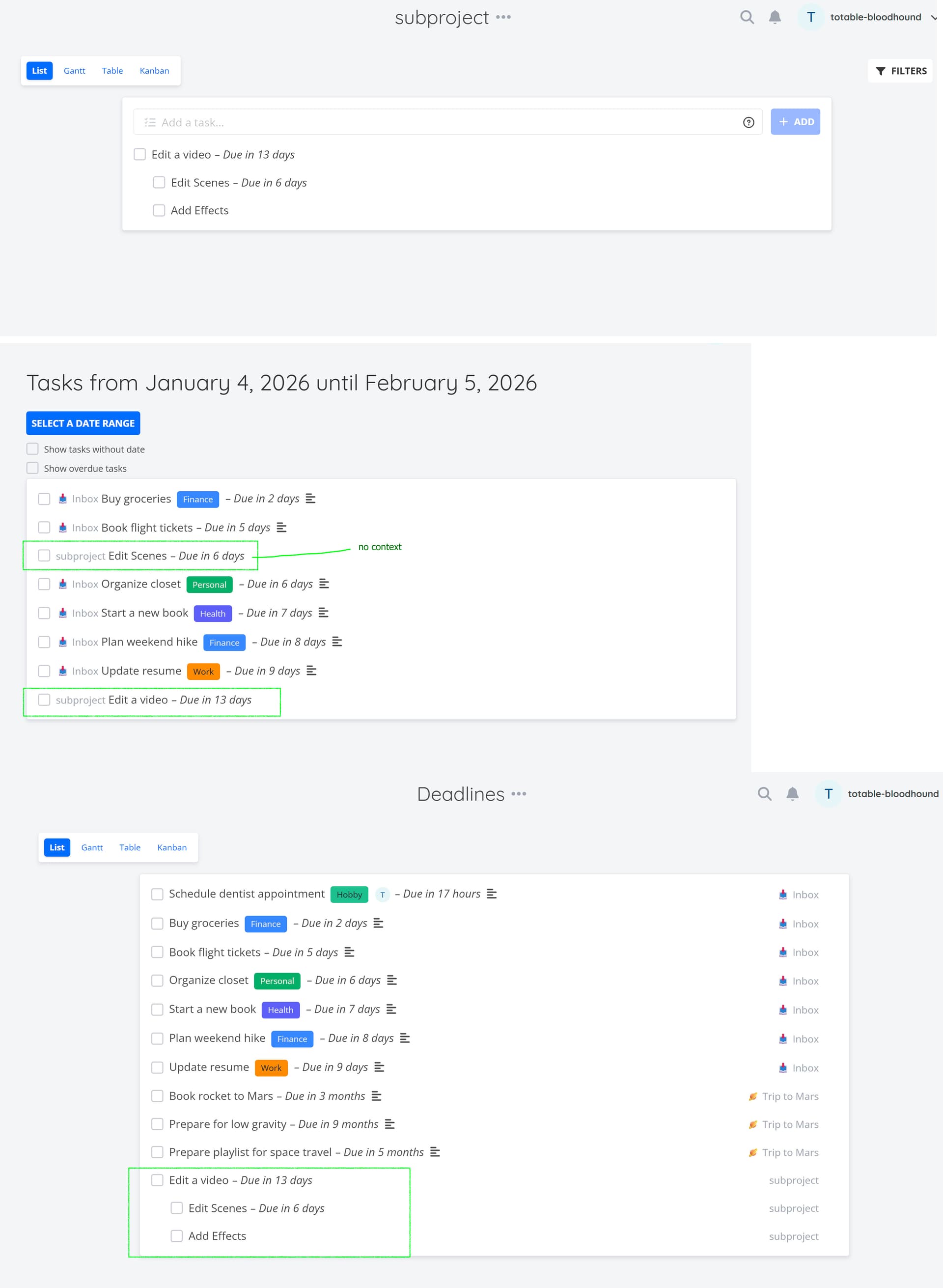
– In Overview the subtasks show up as their own task, at which point it’s not immediately clear what project/parent they belong to.
– In Upcoming view, only the tasks that have a due date get shown (by default), so any subtasks without a Due Date aren’t shown (+ no hierarchy due to sorting by due date).
– Saved Filters do display subtasks, even when they don’t have a due date, but you can’t sort them.
Here’s some screenshots of how the display differs (project view / Upcoming / Saved Filter)
Problem: No fine-tuning if individual points do need earlier due dates, and no overview in views (need to open task).
The project approach seems like the only one where context for individual tasks is guaranteed and less work is required in setting it up (no need to link subtasks).
Any inputs or ideas or features I haven’t checked out? (for ex. I haven’t looked into kanban view at all yet).
I’d say this depends on what these steps that are part of “editing a video” are.
If they are big things that need their own due dates, comments, assignees, etc, they should be subtasks. If they are merely steps that are part of the broader workflow, a checklist is the way to go.
Thanks for the welcome & the input! I am hyperfixating on this right now (currently hoping to actually contribute but it would be my first time doing so) - on that note thank you for such a cool project
The thing is that I use my todo lists kinda like a scheduler/agenda too (I’m not sure how other people typically do this).
So technically what I would need if I were to use the checklist is a way to both have a deadline configured for the overall task and a “do date” for when I work on that task (this would be doable via subtasks, but as mentioned some views don’t provide context for what task that is a subtask of) or by using the end-date as the stand-in for the actual deadline, but that feels sub-ideal since the end date isn’t visible in list view.
Perhaps I’ll try out a mix of both , i.e.:
Task: DEADLINE: - Due ….
Subtask: Work on - Due … (the “do” date/s)
Checklist of tasks that need to be done
I kinda realize now that the Support category is perhaps not ideal for more of a more open-ended topic without a clear-cut point of solution ^^°


 , i.e.: