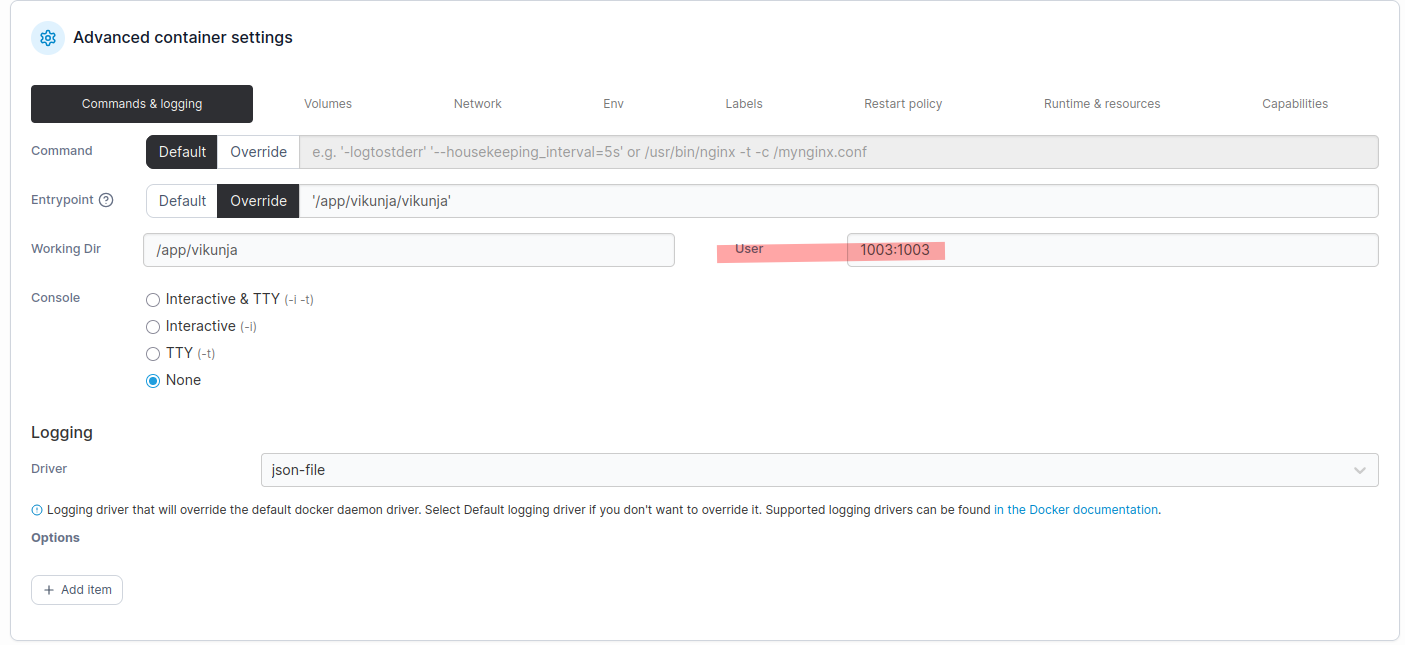
I installed Vikunja via Portainer (docker compose) and it seems to be working very well (after initial teething issues). Now I cannot upload attachments. The webUI does nothing, and the logs are clear, its a permission issue.
(X11; Linux x86_64; rv:146.0) Gecko/20100101 Firefox/146.0
"time=2026-01-07T02:06:16.413Z level=ERROR msg="open /app/vikunja/files/11: permission denied"
What I don’t understand is that I a starting the container with user/group arguments (environment) which correspond to a local user in the base OS (Rocky Linux). User/group are vikunja:vikunja with UID=1003 and GID=1003.
The docker compose is:
services:
  vikunja:
    image: vikunja/vikunja
    environment:
      VIKUNJA_DATABASE_HOST: *************
      VIKUNJA_DATABASE_PASSWORD: *************
      VIKUNJA_DATABASE_TYPE: mysql
      VIKUNJA_DATABASE_USER: *************
      VIKUNJA_DATABASE_DATABASE: *************
      VIKUNJA_SERVICE_PUBLICURL: http://*************
      VIKUNJA_SERVICE_ENABLETASKATTACHMENTS: 1
      VIKUNJA_SERVICE_ENABLEREGISTRATION: 1
      VIKUNJA_SERVICE_ENABLEEMAILREMINDERS: 1
      VIKUNJA_MAILER_ENABLED: 1
      VIKUNJA_MAILER_FORCESSL: 1
      VIKUNJA_MAILER_HOST: *************
      VIKUNJA_MAILER_PORT: *************
      VIKUNJA_MAILER_USERNAME: *************
      VIKUNJA_MAILER_PASSWORD: *************
      PUID: 1003
      PGID: 1003
    volumes:
      - /home/vikunja/files:/app/vikunja/files
    restart: unless-stopped
    networks:
      - frontend
    labels:
      - traefik.enable=true
      - traefik.docker.network=frontend
      - traefik.http.routers.vikunja.rule=Host(`*************`)
      - traefik.http.routers.vikunja-http.entrypoints=web

networks:
  frontend:
    external: true
As you can see the local (in host OS) folder /home/vikunja/files is mapped to the internal container path “/app/vikunja/files”.
Issue 1: the subfolder “files” was not automatically created by the container. I had to manually create it (mkdir). Then I ran a chown 1003:1003 on the parent folder (vikunja) to make sure the container user (1003:1003) was the owner of the folder structure. It is confirmed by:
ls -l

drwx------ 3 vikunja vikunja 75 Jan 6 20:46 vikunja
Issue 2: Although the folder “files” exists, and I restarted the container, uploads still dont work and the folder remains empty with the same permission denied error. Everything else in the logs seems to me http 200 messages….
Issue 3: To see under what user the container is running, I tried to go into console from portainer, both the bash and sh are doing nothing. I tried to access from the host OS with “docker exec -it vikunja-vikunja-1 bash” and I get:
OCI runtime exec failed: exec failed: unable to start container process: exec: "bash": executable file not found in $PATH: unknown
Same error with SH…
Issue 4: I cannot export my data, when I press Download I see the following error although I am using my password to login (I quadrupled check…….)
time=2026-01-07T02:12:12.860Z level=ERROR msg="Wrong username or password"
time=2026-01-07T02:12:12.860Z level=INFO msg="POST /api/v1/user/export/download" component=http status=403 remote_ip=192.168.210.20 latency=190.979831ms user_agent="Mozilla/5.0 (X11; Linux x86_64; rv:146.0) Gecko/20100101 Firefox/146.0"
Basically, so far only the webUI and database (MySQL) are working fine…