NA9D
17 February 2026 17:49
1
Hi all,
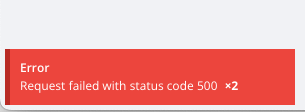
I just installed Vikunja yesterday in a Docker Container on my NAS. It is working pretty well so far but I am getting a “Request failed with status code 500” error whenever I do anything. But everything seems to be working. I am not sure what is wrong here. Any advice?
NA9D
17 February 2026 21:07
3
Here is all I have for the logs in the Container:
2026-02-16 23:57:45+00:00 [Note] [Entrypoint]: Entrypoint script for MariaDB Server 1:10.11.16+maria~ubu2204 started.
2026-02-16 23:57:45+00:00 [Warn] [Entrypoint]: /sys/fs/cgroup/ame=systemd:/docker/4cc4a0ec37faf237492282870373c280366b1be3f1a0b817be1e95bb17b3b3a8
8:pids:/docker/4cc4a0ec37faf237492282870373c280366b1be3f1a0b817be1e95bb17b3b3a8
7:freezer:/docker/4cc4a0ec37faf237492282870373c280366b1be3f1a0b817be1e95bb17b3b3a8
6:devices:/docker/4cc4a0ec37faf237492282870373c280366b1be3f1a0b817be1e95bb17b3b3a8
5:blkio:/docker/4cc4a0ec37faf237492282870373c280366b1be3f1a0b817be1e95bb17b3b3a8
4:cpuacct:/docker/4cc4a0ec37faf237492282870373c280366b1be3f1a0b817be1e95bb17b3b3a8
3:cpuset:/docker/4cc4a0ec37faf237492282870373c280366b1be3f1a0b817be1e95bb17b3b3a8
2:memory:/docker/4cc4a0ec37faf237492282870373c280366b1be3f1a0b817be1e95bb17b3b3a8
1:cpu:/docker/4cc4a0ec37faf237492282870373c280366b1be3f1a0b817be1e95bb17b3b3a8/memory.pressure not writable, functionality unavailable to MariaDB
2026-02-16 23:57:45+00:00 [Note] [Entrypoint]: Switching to dedicated user 'mysql'
2026-02-16 23:57:45+00:00 [Note] [Entrypoint]: Entrypoint script for MariaDB Server 1:10.11.16+maria~ubu2204 started.
2026-02-16 23:57:45+00:00 [Note] [Entrypoint]: Initializing database files
2026-02-16 23:57:45 0 [Warning] mariadbd: io_uring_queue_init() failed with EPERM: sysctl kernel.io_uring_disabled has the value 2, or 1 and the user of the process is not a member of sysctl kernel.io_uring_group. (see man 2 io_uring_setup).
create_uring failed: falling back to libaio
2026-02-16 23:57:47+00:00 [Note] [Entrypoint]: Database files initialized
2026-02-16 23:57:47+00:00 [Note] [Entrypoint]: Starting temporary server
2026-02-16 23:57:47+00:00 [Note] [Entrypoint]: Waiting for server startup
2026-02-16 23:57:47 0 [Note] Starting MariaDB 10.11.16-MariaDB-ubu2204 source revision 3218602d3100db9ce7a875511a591cddc173cc16 server_uid 2X9lEtAqXJ7OGXTRRlWUqiABEPA= as process 90
2026-02-16 23:57:47 0 [Note] InnoDB: Compressed tables use zlib 1.2.11
2026-02-16 23:57:47 0 [Note] InnoDB: Using transactional memory
2026-02-16 23:57:47 0 [Note] InnoDB: Number of transaction pools: 1
2026-02-16 23:57:47 0 [Note] InnoDB: Using crc32 + pclmulqdq instructions
2026-02-16 23:57:47 0 [Warning] mariadbd: io_uring_queue_init() failed with EPERM: sysctl kernel.io_uring_disabled has the value 2, or 1 and the user of the process is not a member of sysctl kernel.io_uring_group. (see man 2 io_uring_setup).
create_uring failed: falling back to libaio
2026-02-16 23:57:47 0 [Note] InnoDB: Using Linux native AIO
2026-02-16 23:57:47 0 [Note] InnoDB: innodb_buffer_pool_size_max=128m, innodb_buffer_pool_size=128m
2026-02-16 23:57:47 0 [Note] InnoDB: Completed initialization of buffer pool
2026-02-16 23:57:47 0 [Note] InnoDB: Buffered log writes (block size=512 bytes)
2026-02-16 23:57:47 0 [Note] InnoDB: End of log at LSN=44942
2026-02-16 23:57:47 0 [Note] InnoDB: 128 rollback segments are active.
2026-02-16 23:57:47 0 [Note] InnoDB: Setting file './ibtmp1' size to 12.000MiB. Physically writing the file full; Please wait ...
2026-02-16 23:57:47 0 [Note] InnoDB: File './ibtmp1' size is now 12.000MiB.
2026-02-16 23:57:47 0 [Note] InnoDB: log sequence number 44942; transaction id 14
2026-02-16 23:57:47 0 [Note] Plugin 'FEEDBACK' is disabled.
2026-02-16 23:57:47 0 [Note] mariadbd: ready for connections.
Version: '10.11.16-MariaDB-ubu2204'  socket: '/run/mysqld/mysqld.sock'  port: 0  mariadb.org binary distribution
2026-02-16 23:57:48+00:00 [Note] [Entrypoint]: Temporary server started.
2026-02-16 23:57:49+00:00 [Note] [Entrypoint]: Creating database vikunja
2026-02-16 23:57:49+00:00 [Note] [Entrypoint]: Creating user vikunja
2026-02-16 23:57:49+00:00 [Note] [Entrypoint]: Giving user vikunja access to schema vikunja
2026-02-16 23:57:49+00:00 [Note] [Entrypoint]: Securing system users (equivalent to running mysql_secure_installation)

2026-02-16 23:57:49+00:00 [Note] [Entrypoint]: Stopping temporary server
2026-02-16 23:57:49 0 [Note] mariadbd (initiated by: unknown): Normal shutdown
2026-02-16 23:57:49 0 [Note] InnoDB: FTS optimize thread exiting.
2026-02-16 23:57:50 0 [Note] InnoDB: Starting shutdown...
2026-02-16 23:57:50 0 [Note] InnoDB: Dumping buffer pool(s) to /var/lib/mysql/ib_buffer_pool
2026-02-16 23:57:50 0 [Note] InnoDB: Buffer pool(s) dump completed at 260216 23:57:50
2026-02-16 23:57:50 0 [Note] InnoDB: Removed temporary tablespace data file: "./ibtmp1"
2026-02-16 23:57:50 0 [Note] InnoDB: Shutdown completed; log sequence number 44942; transaction id 15
2026-02-16 23:57:50 0 [Note] mariadbd: Shutdown complete
2026-02-16 23:57:50+00:00 [Note] [Entrypoint]: Temporary server stopped

2026-02-16 23:57:50+00:00 [Note] [Entrypoint]: MariaDB init process done. Ready for start up.

2026-02-16 23:57:50 0 [Note] Starting MariaDB 10.11.16-MariaDB-ubu2204 source revision 3218602d3100db9ce7a875511a591cddc173cc16 server_uid 2X9lEtAqXJ7OGXTRRlWUqiABEPA= as process 1
2026-02-16 23:57:50 0 [Note] InnoDB: Compressed tables use zlib 1.2.11
2026-02-16 23:57:50 0 [Note] InnoDB: Using transactional memory
2026-02-16 23:57:50 0 [Note] InnoDB: Number of transaction pools: 1
2026-02-16 23:57:50 0 [Note] InnoDB: Using crc32 + pclmulqdq instructions
2026-02-16 23:57:50 0 [Warning] mariadbd: io_uring_queue_init() failed with EPERM: sysctl kernel.io_uring_disabled has the value 2, or 1 and the user of the process is not a member of sysctl kernel.io_uring_group. (see man 2 io_uring_setup).
create_uring failed: falling back to libaio
2026-02-16 23:57:50 0 [Note] InnoDB: Using Linux native AIO
2026-02-16 23:57:50 0 [Note] InnoDB: innodb_buffer_pool_size_max=128m, innodb_buffer_pool_size=128m
2026-02-16 23:57:50 0 [Note] InnoDB: Completed initialization of buffer pool
2026-02-16 23:57:50 0 [Note] InnoDB: Buffered log writes (block size=512 bytes)
2026-02-16 23:57:50 0 [Note] InnoDB: End of log at LSN=44942
2026-02-16 23:57:50 0 [Note] InnoDB: 128 rollback segments are active.
2026-02-16 23:57:50 0 [Note] InnoDB: Setting file './ibtmp1' size to 12.000MiB. Physically writing the file full; Please wait ...
2026-02-16 23:57:50 0 [Note] InnoDB: File './ibtmp1' size is now 12.000MiB.
2026-02-16 23:57:50 0 [Note] InnoDB: log sequence number 44942; transaction id 14
2026-02-16 23:57:50 0 [Note] InnoDB: Loading buffer pool(s) from /var/lib/mysql/ib_buffer_pool
2026-02-16 23:57:50 0 [Note] Plugin 'FEEDBACK' is disabled.
2026-02-16 23:57:50 0 [Warning] You need to use --log-bin to make --expire-logs-days or --binlog-expire-logs-seconds work.
2026-02-16 23:57:50 0 [Note] InnoDB: Buffer pool(s) load completed at 260216 23:57:50
2026-02-16 23:57:50 0 [Note] Server socket created on IP: '0.0.0.0', port: '3306'.
2026-02-16 23:57:50 0 [Note] Server socket created on IP: '::', port: '3306'.
2026-02-16 23:57:50 0 [Note] mariadbd: ready for connections.
Version: '10.11.16-MariaDB-ubu2204'  socket: '/run/mysqld/mysqld.sock'  port: 3306  mariadb.org binary distribution
To me, this looks just like startup. Is there any command or anything else that will give me more details?
I’ll pull the dev logs from my browser to in a bit.
NA9D
17 February 2026 21:12
4
OK. So here is a screen shot of the browser logs. It looks like some of my problem is that I selected the Gravatar option for my user image and that is not working for some reason. There is another error though:
NA9D
17 February 2026 21:15
6
Sorry for all these. Looks like I can only embed one thing at a time as a new user…
    }
    function b(A) {
        t.value = A
    }
    function y(A) {
        n.value = A
    }
    async function w() {
        !r.value || !r.value.username || (hE(r.value), i.value = await dE(r.value, 40))
    }
    function S() {
        s.value = new Date
    }
    async function O(A) {
        const x = xa();
        h(!0),
        Xp();
        try {
            const M = await x.post("login", Ui(A));
            Lf(M.data.token, !0),
            await C()
        } catch (M) {
            throw M.response && M.response.data.code === 1017 && !A.totpPasscode && y(!0), M
        } finally {
            h(!1)
        }
    }
NA9D
23 February 2026 21:31
7
Turns out this error was because of trying to pull my Gravatar icon. Not sure why it wasn’t working but I selected something else and the error went away.
For a Vikunja 500 error, I’d check the application logs first before assuming the database is broken. A 500 usually means the API hit an internal error. In the linked case, the MariaDB container was actually starting fine and the issue turned out to be related to the user avatar/Gravatar setting, not the DB itself.
I’d check:
docker logs <vikunja-container>
and also verify the database connection settings in Vikunja config/environment.
If you are using MariaDB, test the connection manually:
mysql -h <db_host> -u <user> -p
If the DB connects and tables are present, focus on Vikunja config, reverse proxy, or frontend errors.
Only if the database itself is showing corruption errors (tables failing to open, crashed tables, missing data) would I consider a recovery option like Stellar Repair for MySQL . For a normal Vikunja 500, I’d troubleshoot the app side first.
NA9D
17 July 2026 14:24
9
Interesting reply 5 months later!
I ended up discovering that this whole issue with Gravatar (and a few other things) were due to the fact that I had a typo in my YAML code for my DNS server. Once that was fixed, everything worked.